Foreword
Recently, I have been learning how to perform JPEG encoding. I searched many articles online and found that few articles explain every detail clearly, leading to many pitfalls during programming. Therefore, I plan to write an article that covers the details as much as possible, combined with Python code. For the specific program, you can refer to my open-source project on GitHub.

Of course, this introduction and the code are not perfect, and may even contain some errors. It can only serve as an introductory guide. Please forgive me.
Various Markers in JPEG Files
Many articles have introduced the markers in JPEG files. I have also uploaded a document that annotates an actual image (click to download) for reference.
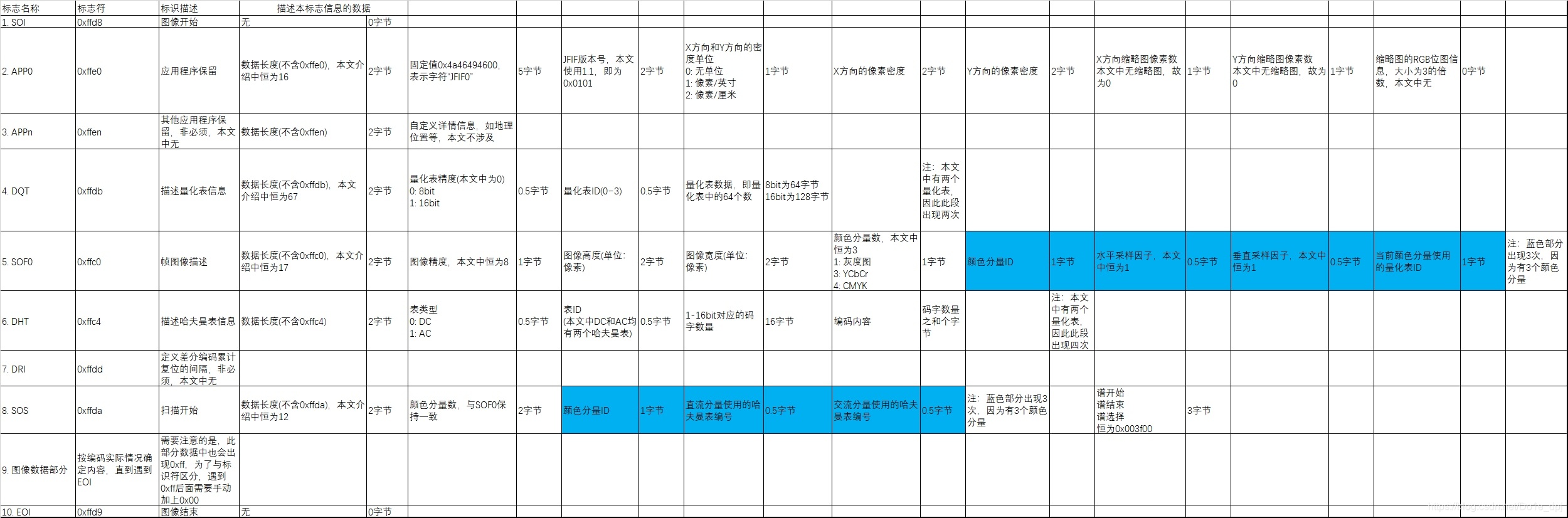
All markers start with 0xff (255 in hexadecimal), followed by the number of bytes representing the data of this block and data describing the block information, as shown in the figure below:
CodeBlock Loading...
At this point, we only have the image data part left to write. But how exactly is the image data encoded, and how are the quantization and Huffman encoding mentioned above implemented? Please see the introduction in the next section.
JPEG Encoding Process
Since JPEG encoding requires dividing the image into 8x8 blocks, the height and width of the image must be multiples of 8. Therefore, we can use image interpolation or subsampling to slightly modify the image so that its height and width become multiples of 8. For an image with thousands of pixels, this operation will not significantly change the overall aspect ratio.
CodeBlock Loading...
Color Space Conversion
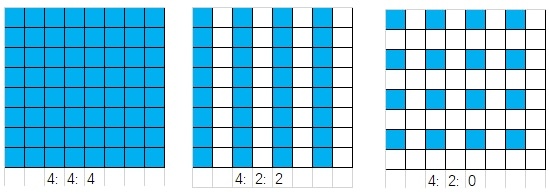
JPEG images uniformly use the YCbCr color space because the human eye is more sensitive to luminance and less sensitive to chrominance. Therefore, we selectively increase the compression of the Cb and Cr components, which can maintain the visual quality while reducing the file size to a greater extent. After converting to the YCbCr space, we can subsample the Cb and Cr color components to reduce their number of points, achieving greater compression. Common sampling formats are 4:4:4, 4:2:2, and 4:2:0. This corresponds to the horizontal and vertical sampling factors in the SOF0 marker. For simplicity, all sampling factors in this article are 1, meaning no subsampling, with one Y component corresponding to one Cb and one Cr component (4:4:4). In 4:2:2, two Y components correspond to one Cb and one Cr component; in 4:2:0, four Y components correspond to one Cb and one Cr component. As shown in the figure below, each cell corresponds to a Y component, and the blue squares are the pixels where Cb and Cr components are sampled.
The formula for color space conversion is:
The above operations are all rounded to integers. In a 24-bit RGB BMP image, the range of the R, G, B components is 0-255. Through simple mathematical relationships, we can easily find that the range of the Y, Cb, Cr components is also 0-255. In JPEG images, we usually need to subtract 128 from each component to make the range include both positive and negative values.
In Python, you can use functions from the OpenCV library to perform color space conversion:
CodeBlock Loading...
8x8 Block Division
In JPEG encoding, each 8x8 block is processed in order from top to bottom and left to right, and finally the data of each block is combined. For the Y, Cb, and Cr color components of each block, the same operations are performed in the order of Y, Cb, Cr (the quantization tables and Huffman tables used may differ).
CodeBlock Loading...
DCT Transform
DCT (Discrete Cosine Transform) converts spatial domain data to the frequency domain for computation. This allows us to selectively reduce high-frequency component data in the frequency domain without significantly affecting the visual quality. Compared to the Discrete Fourier Transform, the Discrete Cosine Transform operates entirely in the real number domain, which is more conducive to computer computation. The formula for the Discrete Cosine Transform is as follows:
where . In JPEG, .
Of course, you can also use functions from the OpenCV library:
CodeBlock Loading...
Quantization
After the DCT transform, the DC component is the first element of the 8x8 block, low-frequency components are concentrated in the upper-left corner, and high-frequency components are concentrated in the lower-right corner. To selectively remove high-frequency components, we can perform quantization, which essentially divides each element in the 8x8 block by a fixed value. In the quantization table, the elements in the upper-left corner are smaller, while those in the lower-right corner are larger. An example of a set of quantization tables is shown below (different quantization tables are used for the Y component and the Cb/Cr components):
CodeBlock Loading...
Quantization process code:
CodeBlock Loading...
After quantization, many zeros appear in the lower-right corner of the 8x8 block. To concentrate these zeros and reduce the amount of data for run-length encoding, we next perform zigzag scanning.
Zigzag Scanning
The so-called zigzag scanning is actually converting the 8x8 block into a list of 64 items in the following order.
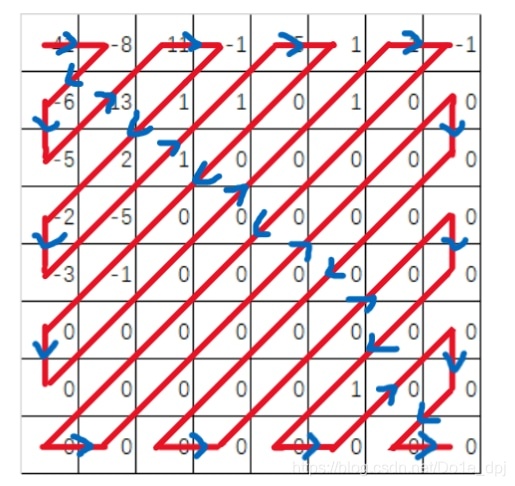
Finally, we obtain a list of length 64 like this: (41, -8, -6, -5, 13, 11, -1, 1, 2, -2, -3, -5, 1, 1, -5, 1, 0, 0, 0, -1, 0, 0, 0, 0, 0, 0, 1, 1, -1, 0, 0, 0, 0, 0, 0, 0, 0, 0, 0, 0, 0, 0, 0, 0, 0, 0, 0, 0, 0, 0, 0, 0, 0, 0, 0, 0, 1, 0, 0, 0, 0, 0, 0, 0). The following operations will use this list as an example.
It should be noted that when storing the quantization table, we also need to perform zigzag scanning on the quantization table accordingly. Storing it in this form is necessary for the image viewer to decode the correct image (I spent a lot of debugging time on this detail initially). This can be seen in the code for writing markers at the beginning of this article.
CodeBlock Loading...
Differential Encoding (DC Component)
The value of the DC component is often large, and the DC components of adjacent 8x8 blocks are often very similar. Therefore, using differential encoding can save space to a greater extent. Differential encoding stores the difference between the DC component of the current block and that of the previous block, while the first block stores its own value. It should be noted that differential encoding is performed separately for the Y, Cb, and Cr components, meaning each component is subtracted from its corresponding previous value. The encoding and storage of the DC component nowblockdc will be introduced later.
CodeBlock Loading...
Run-Length Encoding of Zeros (AC Component)
After zigzag scanning, many zeros are concentrated together. The list of AC components is: (-8, -6, -5, 13, 11, -1, 1, 2, -2, -3, -5, 1, 1, -5, 1, 0, 0, 0, -1, 0, 0, 0, 0, 0, 0, 1, 1, -1, 0, 0, 0, 0, 0, 0, 0, 0, 0, 0, 0, 0, 0, 0, 0, 0, 0, 0, 0, 0, 0, 0, 0, 0, 0, 0, 0, 1, 0, 0, 0, 0, 0, 0, 0).
Run-length encoding of zeros stores two numbers each time: the second number is a non-zero value, and the first number is the count of zeros preceding that non-zero value. Finally, two zeros are used as an end marker (especially note that when the input data does not end with a zero, two zeros are not needed as an end marker; this bug took me a long time to find, see line 23 of the code below). For the above list, after run-length encoding we get: (0, -8), (0, -6), (0, -5), (0, 13), (0, 11), (0, -1), (0, 1), (0, 2), (0, -2), (0, -3), (0, -5), (0, 1), (0, 1), (0, -5), (0, 1), (3, -1), (6, 1), (0, 1), (0, -1),(27, 1), (0, 0). The length of this data is 42, which is a slight reduction compared to the original 63. Of course, this is a special data set; actual data will have more zeros, or even all zeros, and the encoded size can be even smaller.
Perhaps you noticed that (27, 1) is marked in red. This is because in the encoding of part 8, the first number is stored as a 4-bit value, so its range is 0~15. Here it obviously exceeds that, so we need to split it into (15, 0), (11, 1), where (15, 0) represents 16 zeros, and (11, 1) represents 11 zeros followed by a 1.
CodeBlock Loading...
JPEG Special Binary Encoding
After the above groundwork, this section will truly introduce how the encoded DC and AC components are written to the file as a data stream.
In JPEG encoding, there is the following binary encoding format:
CodeBlock Loading...
For a number to be stored, we need to obtain the bit length and the actual binary value to be stored according to the above format. Observing the pattern, it is easy to see that for positive numbers, the stored value is its actual binary representation, and the bit length is its actual bit length. For the corresponding negative numbers, the bit length is the same, and the binary value is the bitwise negation of the positive value. Zero does not need to be stored.
CodeBlock Loading...
For the DC component, suppose the value after differential encoding is -41. According to the above operation, we can get its bit length as 6, and the stored binary data stream is 010110. For the value 6, we need to use canonical Huffman encoding to store its binary data stream, which will be introduced in part 9. Let's assume the binary data stream stored for 6 is 100. Then the DC component of a certain color component of this 8x8 block is stored as 100010110.
After writing the binary data stream of the DC component to the file, we then encode the AC components of this color component of the 8x8 block. The values obtained after run-length encoding are: (0, -8), (0, -6), (0, -5), (0, 13), (0, 11), (0, -1), (0, 1), (0, 2), (0, -2), (0, -3), (0, -5), (0, 1), (0, 1), (0, -5), (0, 1), (3, -1), (6, 1), (0, 1), (0, -1),(15, 0), (11, 1) , (0, 0).
First, store (0, -8). For the second number, perform the same operation to get 4 bits and 0111. However, unlike the DC component, we need to perform canonical Huffman encoding on 0x04, where the upper four bits are the first number of (0, -8) and the lower four bits are the bit length of the second number. Assuming the canonical Huffman encoding of 0x04 is stored as 1011, then (0, -8) is stored as 10110111. Next, perform the same operation for (0, -6) etc., and write the resulting data stream to the file sequentially.
Another example: (6, 1). Here, 1 is stored as 1, 1 bit, so we perform canonical Huffman encoding on 0x61. Assuming it is 1111011, then (6, 1) is stored as 11110111. For (15, 0), only the canonical Huffman encoding value of 0xf0 is stored.
After writing the data of one color component (say Y) following the above process, we then write the data of the Cb color component of this 8x8 block, and then the Cr component. After writing the data of each 8x8 block in the same way from left to right and top to bottom, we write the EOI marker (0xffd9) as the end of the image.
Note: During the data writing process, we need to check if the byte being written is 0xff. To prevent marker conflicts, we need to append 0x00 after it.
CodeBlock Loading...
Canonical Huffman Encoding
The canonical Huffman encoding introduced in this article has four encoding tables, used for luminance DC component, chrominance DC component, luminance AC component, and chrominance AC component, respectively.
CodeBlock Loading...
In the above code, stdhuffmanDC0 etc. are the values actually stored in the markers, as can be seen in the code for marker introduction. Among these numbers, the first 16 numbers (0, 0, 7, 1, 1, 1, 1, 1, 0, 0, 0, 0, 0, 0, 0, 0) represent how many codes there are for each length from 1 to 16 bits. The following 12 numbers are exactly the sum of the first 16 numbers. What stdhuffmanDC0 describes is actually the following figure:
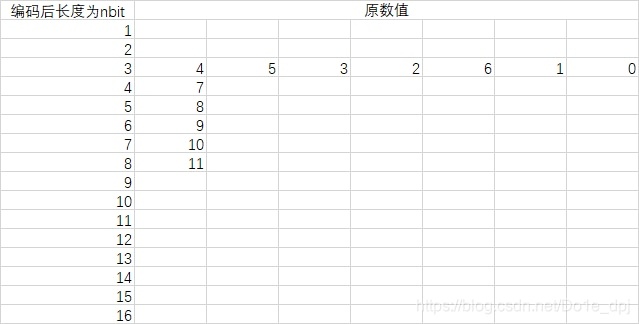
Now we only know the encoded data length for each original data, but not its actual value.
Canonical Huffman encoding has its own set of rules:
- The code of the first number with the minimum code length is 0;
- Codes with the same code length are consecutive;
- The code a of the first number of the next code length (assume j) depends on the code b of the last number of the previous code length (assume i), i.e.,
a=(b+1)<<(j-i).
From rule 1, we can know that the code for 4 is 000. From rule 2, the code for 5 is 001, for 3 is 010, for 2 is 011..., for 0 is 110. From rule 3, the code for 7 is 1110, for 8 is 11110...
CodeBlock Loading...
The final Huffman dictionary is quite long and can be viewed in my GitHub project. By finding the pattern, you can understand how the dictionary index in the write_num function is obtained that way.