Foreword
Recently, I used Next.js to build some full-stack projects, and used better-auth for user authentication.
However, in practice, I found that AI-generated code often transmits passwords in plain text. Although HTTPS is normally used in production and TLS encryption is already in place at the transport layer, this doesn't mean you can casually stuff plaintext passwords into request bodies.
HTTPS only ensures transport security between the browser and the TLS termination point (e.g., nginx). Passwords still appear in plaintext at the reverse proxy, gateway, logs, database, etc. This means anyone with access to these can easily log into everyone's accounts. For personal projects, you might ignore password encryption, but it's clearly not acceptable for a product.
Hence this blog post, explaining how to apply RSA asymmetric encryption to passwords at the application layer when using better-auth. Perhaps feeding this material to AI can help implement similar solutions in other projects, but please comply with the MIT license for attribution, see the end of the article.
Overall Flow
- The user enters the password in the browser.
- The frontend reads
NEXT_PUBLIC_RSA_PUBLIC_KEY. - Encrypt the password using RSA-OAEP.
- The encrypted package includes a timestamp, random salt, request ID, and HMAC signature.
- The frontend sends the encrypted string to better-auth.
- The server decrypts within better-auth's
password.hash/password.verify. - Finally, only the bcrypt hash is stored in the database.
Throughout the flow, the plaintext password only appears when the user enters it.
Client-Side Encryption
CodeBlock Loading...
Here, we didn't just encrypt the password itself; instead, we put several fields together into the RSA ciphertext:
password|timestamp|salt|requestId
Where:
passwordis the original password entered by the user.timestampis used to determine if the request has expired.saltensures that the same password produces different ciphertext each time.requestIdis used to prevent replay attacks.
On the login page, before submitting to better-auth, rsaEncrypt is called first.
CodeBlock Loading...
The same applies during registration:
CodeBlock Loading...
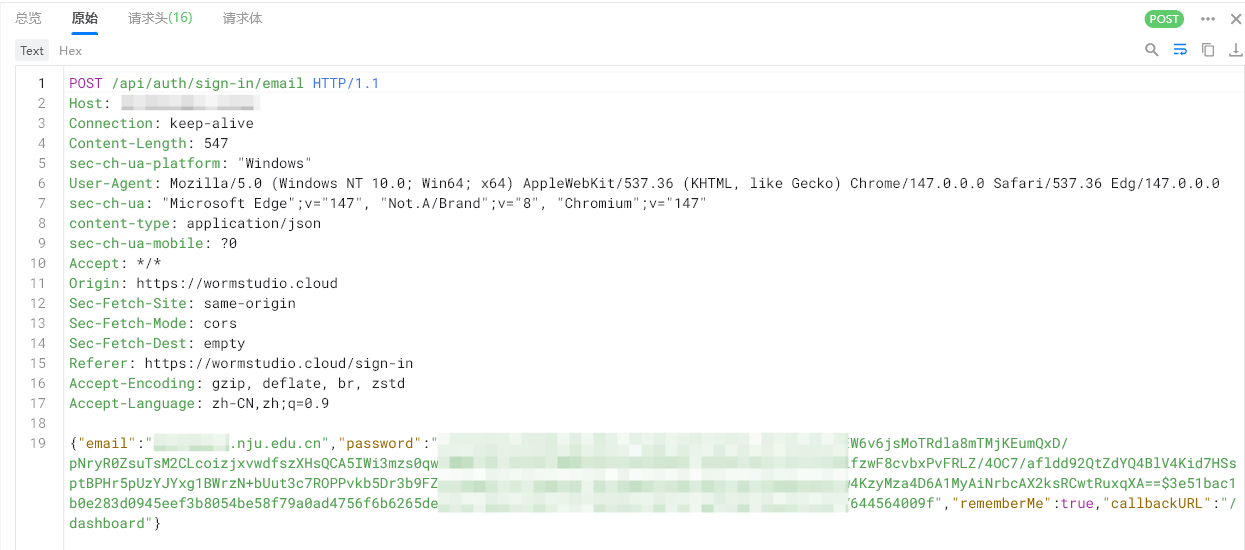
This way, when capturing packets, the password field is no longer the original password but an RSA-encrypted data package.
Server-Side Decryption
First, decrypt with the private key:
CodeBlock Loading...
Then perform unified validation:
CodeBlock Loading...
Here, several things are done:
- Check the encrypted package format.
- Check if the timestamp has expired.
- Check if the
requestIdhas already been used. - Decrypt with the RSA private key.
- Check if the outer timestamp matches the inner timestamp.
- Check if the outer request ID matches the inner request ID.
- Verify the HMAC signature.
- Return the bcrypt hash of the password.
Deduplication of requestId uses Redis:
CodeBlock Loading...
That is, only the first request can be written successfully; subsequent reuse of the same requestId will be rejected, preventing replay attacks.
The commands to generate the public/private key pair are as follows:
CodeBlock Loading...
Of course, using ssh-keygen directly is also feasible, and it's essential to ensure the security of the private key.
Integrating with better-auth
better-auth handles email/password login by default, but here we need to customize the password handling logic to implement encryption and hashing.
CodeBlock Loading...
There's a detail here: better-auth's minPasswordLength is set to 1, and maxPasswordLength to 4096.
The reason is that what's passed to better-auth is no longer the original password but the RSA-encrypted data package. If the default length limits were kept, it would easily be intercepted at the better-auth layer.
If you need to limit the password length, it can only be done in the client-side rsaEncrypt.
Of course, better-auth only requires password verification in login and registration scenarios by default. For places like changing passwords or deleting accounts, just reuse rsaEncrypt and rsaDecryptAndValidate.
Other Security Configurations for better-auth
In addition to password encryption, you can also configure some security options when initializing betterAuth:
CodeBlock Loading...
The meanings are roughly as follows:
- Do not disable CSRF checks.
- Use Secure Cookie in production.
- Set Cookie
httpOnly. - Set Cookie
sameSite: "lax".
And rate limiting for login, registration, and password reset:
CodeBlock Loading...
This can reduce issues like credential stuffing, registration spam, and email spam.